# Đăng ký đặt mua và cọc

### <mark style="color:green;">Thực hiện đặt mua</mark>

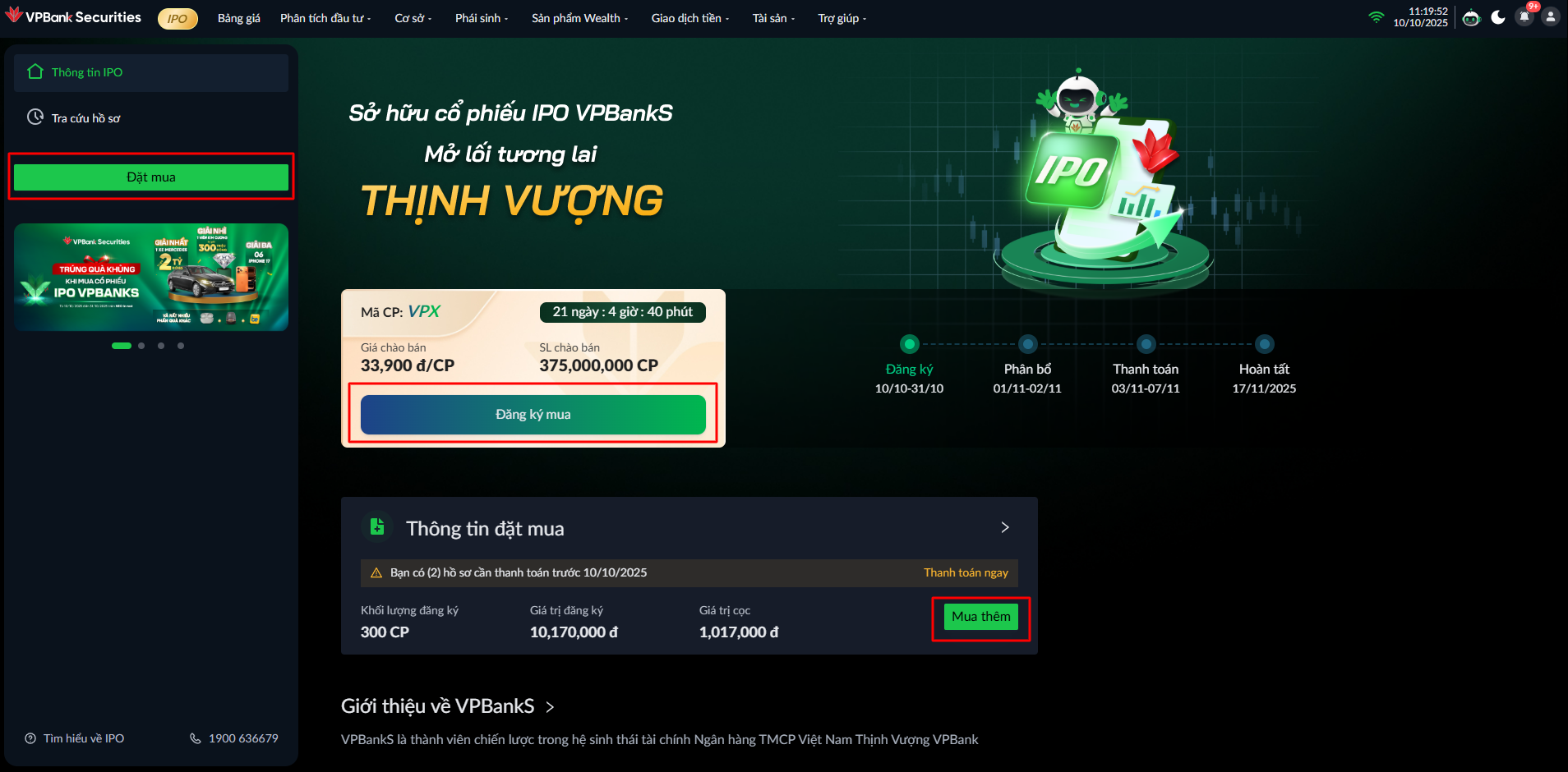
Để thực hiện đặt mua cổ phiếu IPO VPBankS, thực hiện theo các cách:

Cách 1: Trên Tab Thông tin IPO > Nhấn <mark style="color:orange;">**Đặt mua**</mark>

Cách 2: Trên Card > Nhấn <mark style="color:orange;">**Đăng ký mua**</mark>

<figure><img src="https://2876185162-files.gitbook.io/~/files/v0/b/gitbook-x-prod.appspot.com/o/spaces%2F0ahJEilc7hgfb9LiCWil%2Fuploads%2F6bPpz0H6O1qO7L8lgXjM%2Fimage.png?alt=media&#x26;token=bdac9da9-7c70-4697-b80a-876f29ae2103" alt=""><figcaption></figcaption></figure>

### <mark style="color:green;">Hiển thị màn hình đặt mua</mark>

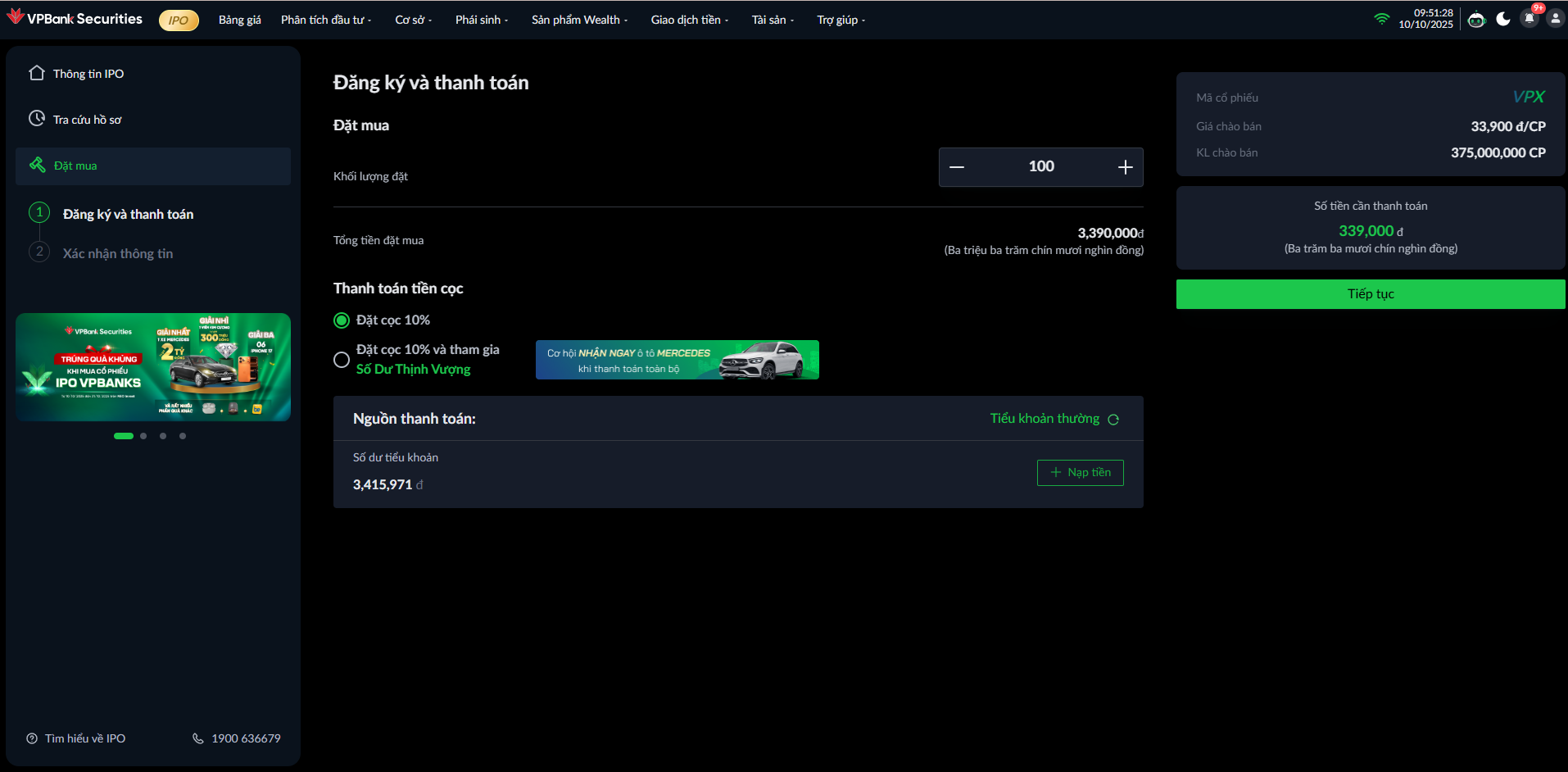
<mark style="color:green;">**Màn hình 1: Đăng ký và chọn thanh toán**</mark>

<figure><img src="https://2876185162-files.gitbook.io/~/files/v0/b/gitbook-x-prod.appspot.com/o/spaces%2F0ahJEilc7hgfb9LiCWil%2Fuploads%2FBXVZIvKYZ6MbDQcSwkvS%2Fimage.png?alt=media&#x26;token=fa2c6721-d90d-48c5-b5e4-ef28757e0406" alt=""><figcaption></figcaption></figure>

<mark style="color:green;">**Bước 1:**</mark> Nhập khối lượng&#x20;

{% hint style="info" %}
Tối thiểu: 100 cổ phiếu

Tối đa: 93.750.000 cổ phiếu
{% endhint %}

<mark style="color:green;">**Bước 2:**</mark> Chọn thanh toán tiền cọc

{% hint style="info" %}
**Phương án 1** - Đặt cọc 10%: Cần thanh toán 10% số tiền cọc

**Phương án 2** - Đặt cọc 10% và tham gia <mark style="color:green;">**Số Dư Thịnh Vượng**</mark>: Cần thanh toán ngay 100% số tiền đăng ký đặt mua, trong đó:

* 10%: Số tiền đặt cọc
* Số tiền còn lại: Được tham gia chương trình <mark style="color:green;">**Số Dư Thịnh Vượng**</mark>
  {% endhint %}

<mark style="color:green;">**Bước 3:**</mark> Kiểm tra số dư tiền trên tiểu khoản thường

Trường hợp thiếu số dư, có thể nạp tiền bằng cách nhấn vào Button <mark style="color:orange;">**Nạp tiền**</mark>

<mark style="color:green;">**Bước 4:**</mark> Nhấn <mark style="color:orange;">**Mua ngay**</mark>

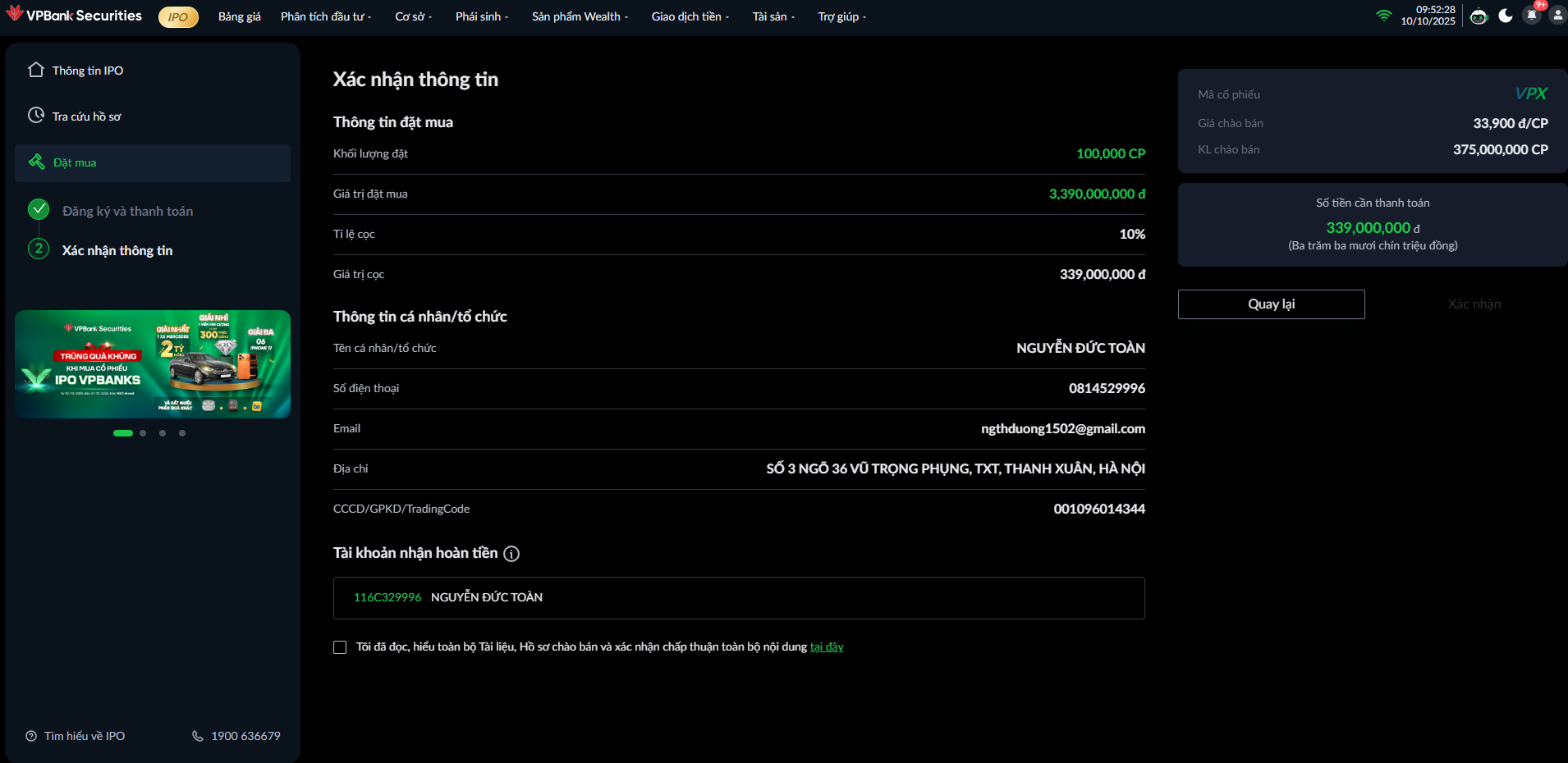
<mark style="color:green;">**Màn hình 2: Xác nhận thông tin**</mark>

<figure><img src="https://2876185162-files.gitbook.io/~/files/v0/b/gitbook-x-prod.appspot.com/o/spaces%2F0ahJEilc7hgfb9LiCWil%2Fuploads%2FJxKCiZ9jcrLASrvwQiWM%2Fimage.png?alt=media&#x26;token=f1782c86-199c-453b-878b-a7269c067caa" alt=""><figcaption></figcaption></figure>

<mark style="color:green;">**Bước 5:**</mark> Kiểm tra các thông tin:

1. Thông tin đặt mua
2. Thông tin cá nhân/tổ chức
3. Thông tin tài khoản hoàn tiền

<mark style="color:green;">**Bước 6**</mark><mark style="color:green;">:</mark> Tick ô xác nhận chấp thuận nội dung đăng ký và thanh toán

<mark style="color:green;">**Bước 7:**</mark> Nhấn <mark style="color:orange;">**Xác nhận**</mark> và nhập phương thức xác thực để hoàn thành đăng ký đặt mua cổ phiếu IPO

### <mark style="color:green;">Thông báo thành công</mark>

<figure><img src="https://2876185162-files.gitbook.io/~/files/v0/b/gitbook-x-prod.appspot.com/o/spaces%2F0ahJEilc7hgfb9LiCWil%2Fuploads%2FUctRYSAdx84QaJJTRFTr%2Fimage.png?alt=media&#x26;token=0ca6f395-78bf-4dbb-9f90-14c027a31e74" alt=""><figcaption></figcaption></figure>