> For the complete documentation index, see [llms.txt](https://hdsd.vpbanks.com.vn/llms.txt). Markdown versions of documentation pages are available by appending `.md` to page URLs; this page is available as [Markdown](https://hdsd.vpbanks.com.vn/web-neo-invest/giao-dich-tien/chuyen-tien-giua-cac-tieu-khoan.md).
# Chuyển tiền giữa các tiểu khoản
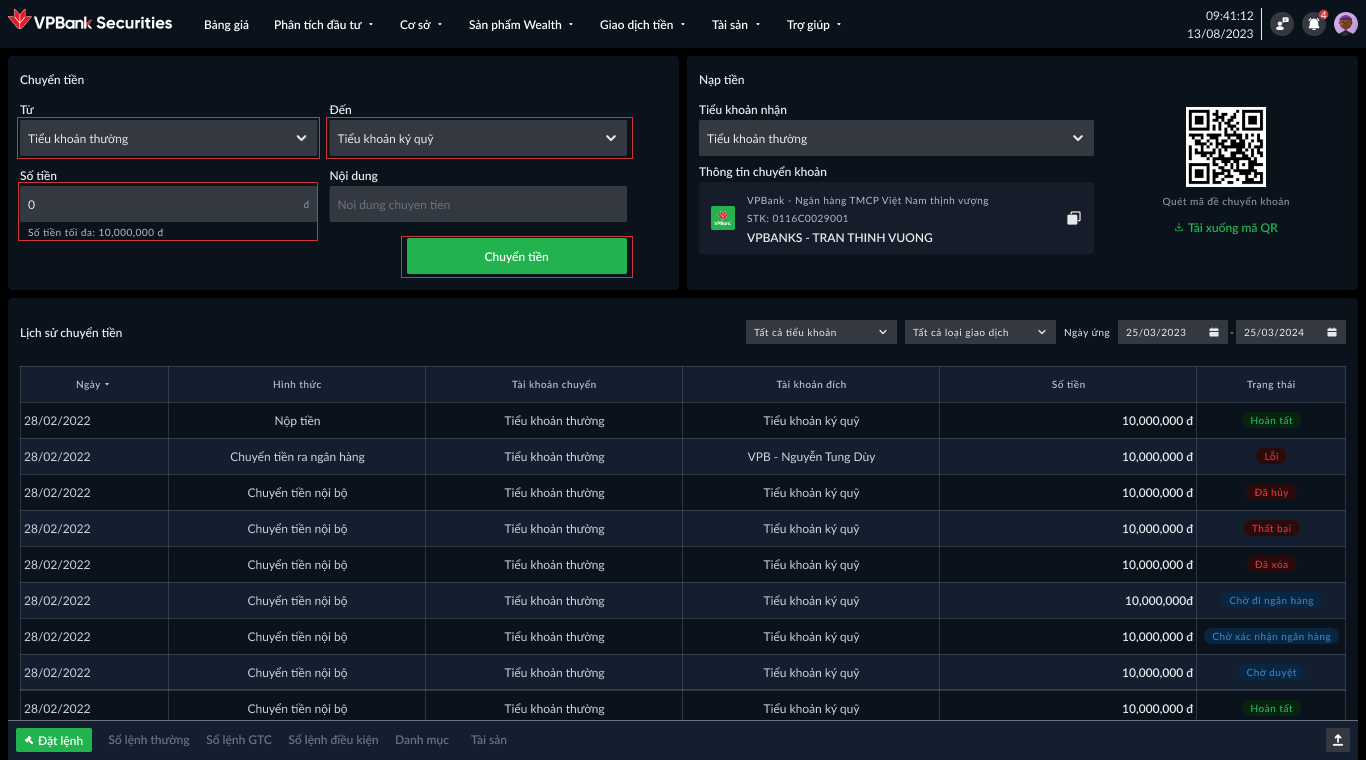
Khi có nhu cầu chuyển tiền giữa các Tiểu khoản vui lòng làm theo hướng dẫn sau:
**Bước 1:** Chọn Menu **Giao dịch tiền ->** Chọn **Nạp/Chuyển tiền**
**Bước 2:** Tại màn hình **Chuyển tiền**. Nhập các thông tin như sau:
* Chọn Tiểu khoản chuyển
* Chọn Tiểu khoản nhận
* Nhập số tiền. Lưu ý số tiền phải nhỏ hơn hoặc bằng số tiền tối đa
Sau đó nhấn **Chuyển tiền** và nhập phương thức xác thực
**Bước 3:** Nhập phương thức xác thực và hoàn tất chuyển tiền.
*Xem hướng dẫn xác thực giao dịch* [***tại đây.***](/web-neo-invest/cai-dat-bao-mat/xac-thuc-giao-dich.md)